
Nice Catch
Screenshots
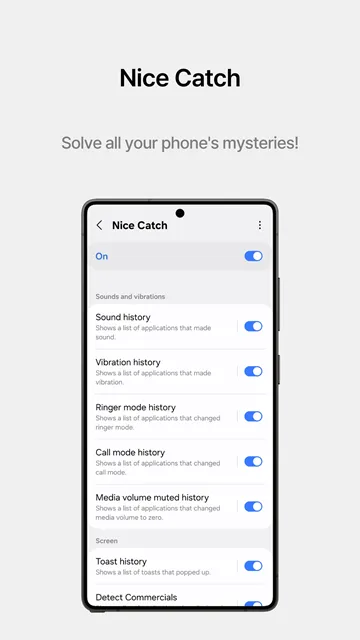
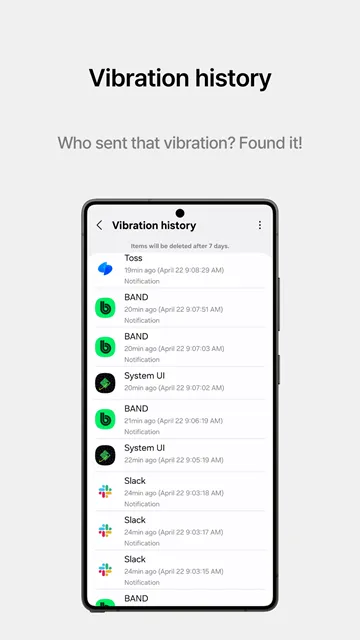
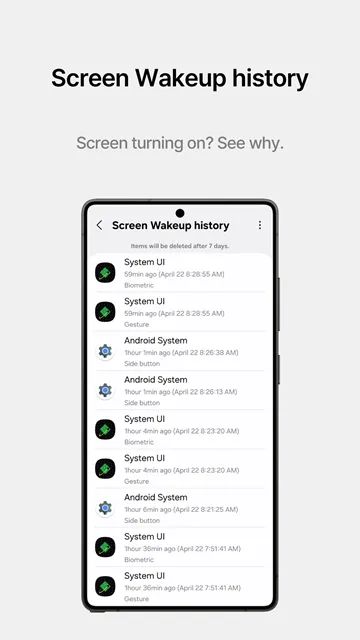
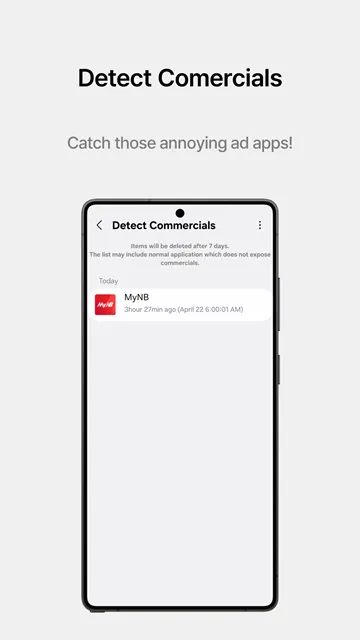
Nice Catch is an incredibly helpful system utility tool for tracking background activity on your mobile device. It actively monitors hidden background events like mystery vibrations or sudden volume modifications without your explicit knowledge. Moreover, this utility acts as a digital watchman to keep your device operating smoothly at all times.
Consequently, you can quickly find which applications cause these annoying changes without your personal permission. This tool records every single background event in a clear and highly organized chronological list. Therefore, users can easily manage rogue applications and maintain complete control over their daily device interactions.
Why Mobile Users Experience Ghost Notifications
Many mobile users suffer from ghost vibrations or sudden silent alerts throughout the busy day. In addition, unexpected notification popups or sudden screen wakeups can deeply disrupt your daily workplace productivity. But pinpointing the exact application responsible for these random system triggers remains incredibly difficult for regular users.
That is to say, apps frequently execute background commands that bypass standard user interface notifications entirely. As a result, your phone behaves erratically while you remain completely unaware of the underlying cause. Fortunately, deploying a dedicated system activity logger provides the transparency necessary to solve these frustrating issues.
How Nice Catch Tracks Background App Behaviors
Nice Catch operates quietly in your system background to log every internal app process trigger. For example, it notes the exact millisecond an application requests an active system vibration alert. In other words, nothing slips past this watchful tool when background apps attempt to modify your device state.
Subsequently, the tool safely stores this valuable event data for up to seven consecutive days. As a result, you can review past activities whenever you notice unusual battery drain or performance drops. Then, you can take immediate action to optimize your mobile device layout based on solid data.
Key Features of Nice Catch App for Android
This utility tool offers a comprehensive suite of logging instruments for curious device owners. Above all, it decodes complex internal system logs into simple readable charts for everyday mobile users. To clarify, you do not need advanced technical knowledge to understand these deep background report metrics.
Moreover, users can toggle individual tracking modules on or off based on their current diagnostic needs. This granular control ensures that your device resources focus exclusively on the logs you care about most. In short, let us examine the specific tracking elements included within this powerful system monitoring package.
Track Unexpected Device Vibrations
Ghost vibrations often drain your phone battery and cause unnecessary confusion during your busy day. Fortunately, Nice Catch captures the precise identity of any background application triggering the internal vibration motor. For instance, it displays the exact name of the app alongside a clear time stamp.
In other words, you no longer have to guess which game or utility is buzzing in your pocket. You simply open the history log to discover the true culprit within a matter of seconds. Subsequently, you can modify the app notification settings to stop the unwanted buzzing permanently.
Monitor Ringer Mode Adjustments
Sometimes your device switches to silent mode or vibrate mode completely on its own accord. To clarify, sneaky background processes might alter your active audio profiles without displaying a visible warning icon. But this specialized tracking module documents every single modification to your system audio volume states.
Therefore, you can see exactly when and why your ringer mode shifted to a silent setting. This tracking feature helps you prevent missed phone calls from important family members or business clients. In addition, you can easily identify if an app behaves maliciously by altering your sound levels.
Catch Hidden Background Advertisement Screens
Certain poorly optimized mobile applications display annoying full-screen advertisements at random intervals during usage. Meanwhile, finding the origin of these intrusive ad popups can feel completely impossible for everyday users. Certainly, Nice Catch solves this frustrating issue by pinpointing the specific application launching the hidden ad layout.
Then, the utility displays a complete report detailing when the advertisement appeared on your touch display screen. As a result, you can instantly delete the problematic application to restore a completely clean user experience. Further, this saves you from downloading sketchy secondary malware cleaners that do not work.
Log Frequent Screen Wakeup Instances
If your mobile display turns on while sitting untouched on a desk, a background trigger is responsible. Subsequently, this constant and unnecessary screen activation wastes precious battery life throughout your afternoon hours. Thankfully, this helpful module registers every application that forces your device screen to light up randomly.
After that, you can quickly review the compilation list to adjust individual background execution privileges. This simple optimization step will dramatically extend your overall battery longevity during heavy daily use. Likewise, it prevents accidental pocket dials or screen touches while walking.
Record Secret System Settings Changes
Some background optimization tools modify critical system configurations without requesting your immediate or direct attention. For instance, an application might silently change your location preferences or alter your network mobile data options. Likewise, Nice Catch tracks these specific alterations in a highly detailed chronological registry list.
You can easily spot unauthorized permission expansions to maintain total device integrity over time. Moreover, this transparency ensures that no rogue application alters your preferred display brightness or timeout values secretly. Therefore, your personalized system choices remain exactly the way you intended them to stay.
Detect Instant Toast Popups
Toast popups are the small grey text notification bubbles that appear briefly at the screen bottom. However, these quick alert messages disappear so fast that you usually miss their exact textual details. In the same vein, this utility captures the precise text content of every single toast popup window.
It links the captured alert message directly to the originating application name for easy user identification. In other words, you can read the notifications later at your own convenience without any rush. This feature is incredibly useful for diagnosing hidden app errors or confirming background download completions.
Keep History of Call Mode Switches
Communication applications often modify your system call settings during voice over internet protocol sessions. To clarify, these tools change how your microphone and internal ear speaker behave during active background connections. Further, Nice Catch maintains a dedicated history log of every single call mode system transition.
You can verify if an application acts inappropriately when you are not actively making calls. Consequently, this feature acts as an excellent privacy shield against potential background audio surveillance attempts. Above all, you gain total clarity regarding which apps access your phone communication channels.
Track Media Volume Mute Actions
Have you ever listened to your favorite music playlist only for the audio to mute suddenly? Frequently, background applications override your media playback controls to prioritize their own internal audio advertisements or alerts. This sudden silencing of your music streams can feel incredibly annoying during your daily workouts.
But this dedicated module monitors all volume adjustments to identify the exact cause of audio muting. Then, you can modify the offending app settings to prevent it from hijacking your media channel. As a result, your music playback experience remains completely uninterrupted and highly enjoyable.
How to Download and Install Nice Catch APK
Getting this helpful diagnostic package onto your mobile device is a quick and straightforward procedure. Firstly, you need to obtain the authentic installation file from a reliable hosting repository website.
- Click the download button on our trusted website to retrieve the file safely.
- Open your device file manager application and locate the downloaded package file.
- Enable installation from unknown sources within your main system security settings menu.
- Tap the package file directly to start the system installation setup wizard.
- Wait patiently for the process to complete and launch the application immediately.
Nice Catch Effective Diagnostic Tips and Tricks
- Check your history logs immediately after you feel a mysterious vibration on your mobile device.
- Turn off individual logging modules that you do not use to save valuable system volatile memory.
- Keep the tool active during the night to catch rogue apps that wake your display screen.
- Review the settings change history to see if newly installed apps are modifying your preferences.
- Use the advertisement log to identify and quickly uninstall apps that display intrusive popups.
- Analyze the media volume logs if your audio streaming keeps muting unexpectedly during playback.
Conclusion
In conclusion, managing unexpected mobile activity becomes incredibly simple when you have the right monitoring tool. This specific tracking application provides the exact data transparency you need to manage rogue background processes. To sum up, installing this utility gives you peace of mind and complete authority over your environment.
Download it today to stop mysterious vibrations and hidden background advertisements once and for all. Further, enjoy a highly optimized user experience free from unexpected screen wakeups or random volume changes. Your device deserves a vigilant watchman to maintain peak operational standards every single day.